Secrets to Love
February, 2026
For February, I had one simple goal: to finally store environment variables and secrets.
And, luckily, I actually did!
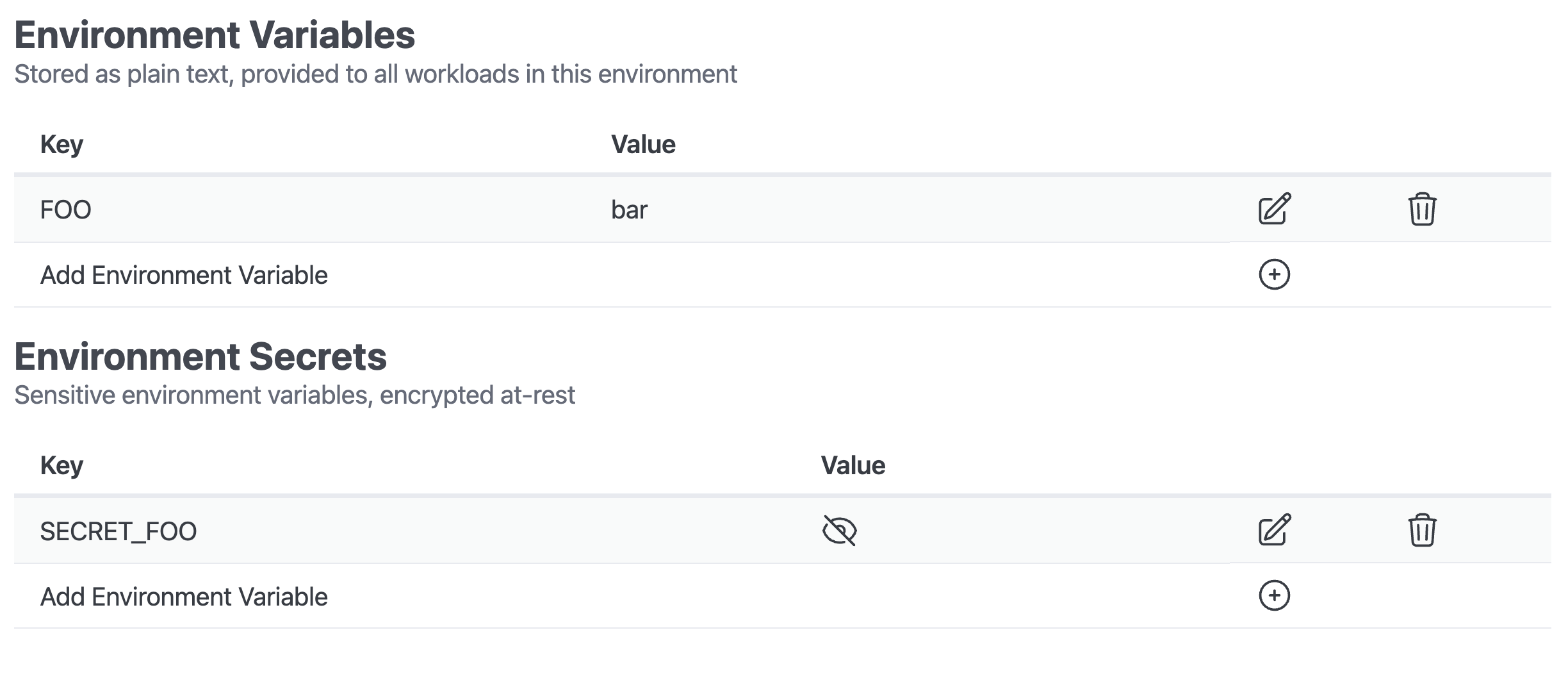
Environment variables are stored in the database in plain text, so that part was easy - despite what my two months of procrastination may have suggested.
Secrets, on the other hand, must be stored securely. They need to be encrypted at-rest, in a proper secret store…
Choosing a Store
There are many self-hostable secret stores, including the ever popular Vault.
But I have made a pretty clear choice for my initial Dorsal build-out, and that’s to prefer AWS-native solutions when one is available. While there is less of an ecosystem benefit than I would have hoped for by doing this, it still drastically limits the landscape of possibilities, which has the benefit of avoiding analysis paralysis.
I, really, just had two options: Parameter Store and Secrets Manager.
Ultimately, Secrets Manager has more functionality, but it comes with a steeper cost. For my current needs, Parameter Store provides the necessary functionality, and so we’re going with that!
As with everything in Dorsal, I’ve created a thin abstraction layer at the Internal API. In the future, if I want to support a different secrets store, the application doesn’t need to know that anything has changed, as it already doesn’t know about AWS Parameter Store.
Theoretically, I could swap-out Parameter Store or add additional secret stores for different kinds of secrets. Either way, they’d all be synced to the EKS Cluster with External Secrets Operator, so they appear the same to the running application.
Authentication
Given that I’m staying in AWS, I have arrived at one situation where services actually do cooperate relatively well: Cognito and STS.
By configuring a (evidently confusing) User Pool custom attribute mapping, I’m now able to have Cognito Identity Pools handle the token exchange with STS, while verifying the custom attribute with Cognito User Pools along the way.
The end result is that I can create a single IAM Role, with AWS Principal, Resource, and Session tag conditions; that is appropriately scoped based on my custom attribute mapping.
Given that Dorsal uses Projects as the outer-most scope, I decided - at least for now - to use this as the outer bounds of permission access.
So, Dorsal can now assume this scoped role on behalf of the requesting user, store/update/delete the secret, and then terminate the STS session. In the event that these session credentials were somehow leaked, they would remain scoped to the project that was used to authenticate the initial request.
While it was confusing to set up, I’m very pleased with this permission flow. It should completely prevent the Dorsal API from, for example, modifying the wrong secrets due to a programming error, as the access policies are baked into the infrastructure and are delegated to Cognito.
Choose a Project
While working on this feature, I recognized that it may make sense to have a global Project selection dropdown that the entire web application inherits.
Rather than having a Projects table, and clicking into one, it may be more appropriate to have a single “Active Project” that the user selects, and then the entire UI can show resources specific to that Project.
While I realized this during the secrets auth scoping build-out, I think it is also just more intuitive and future-proof. Having users share Project access could be much more manageable one day if the UI is already assuming that a single Project is being viewed at a time.
I haven’t committed to this idea yet, but I think I like it.
Automated Deployments
The only functionality that I haven’t managed to complete this month with respect to environment variables and secrets is automatically re-deploying the applications that reference these secrets.
This would be very easy, but I have some legacy (on a 14 month old project?) implementations of a Kubernetes ConfigMap in Pulumi that needs to be migrated to the Helm Chart.
Once I’ve finished with a couple other things, like possibly switching Project IDs from serial integers to UUIDs, the next step will be to update the Helm Chart logic. Up to this point, I have largely hacked around necessary functionality that I haven’t figured out how to properly implement yet, most notably: sidecars.
The data models will need to be updated at the database level to support more of the Kubernetes Deployment configuration that I’ll need, so this may mean a full Helm Chart rewrite once the database is sorted.
The State of Things
Despite the hacky and incomplete nature of much of Dorsal at this point, there are some glimmers of light.
Last year, I started homelabbing, and I’ve actually been using Dorsal to manage some elements of a Dorsal Test environment that I’m now self-hosting.
To make this work, I logged into the Dorsal UI, created a new Environment (“Test”) for my Dorsal Project with a new subdomain. I associated this “Test” environment with my existing “Dev Users” User Pool, which I also created and manage via the Dorsal web app.
This gave the User that I use when logging into my local development environment (localhost) SSO access to the new Test environment. I could then simply spin-up the application on my homelab, add a local DNS record for my Test environment to Pi Hole, and pull up a full Dorsal Test Environment with Cognito-managed authentication.
I don’t have enough RAM to run a proper Kubernetes Cluster on my home server, as it’s just an old computer that my wife had lying around - and who can afford RAM these days?!
But the Docker Compose environment that I use for local development gets the job done for now. A self-hosted Kubernetes Cluster is my eventual goal, and I’d like to use it to test “Bring Your Own Compute” functionality one day.
In the meantime, having a semi-persistent environment for testing things like database migrations in an affordable Test environment is a win, and it was fun to set this all up on my home server.
As always, I have many ideas and only so much time to implement them, but I’m actually satisfied with how things are progressing.
Cross your fingers for March. See you next month.